
SaaS Content Writing: How to Turn Blog Visitors Into Paying Customers
You just published another blog post, and it’s ranking on page one within 60 days. You watch the traffic numbers climb in Google Analytics, 500 visitors this month, then 1,200, then 2,500. Eventually, it skyrocketed to 10,000. Your CEO is happy, and your marketing team is celebrating.
Then you open your Analytics dashboard.
12 signups, from over 10,000 visitors. That’s less than a 0.2% conversion rate.
You check the previous month’s content. Same story. Thousands of visitors are reading your “Ultimate Guide to [Industry Topic],” spending an average of 4 minutes on the page, then leaving without ever clicking “Start Free Trial.”
This is where most SaaS blogs break down. They treat content as a traffic channel, not a growth lever. SaaS content writing is about creating content that attracts buyers with intent, guides them through evaluation, and nudges them towards using your product.
In the words of Brian Dean, founder of Backlinko, “Without targeted traffic, your site might as well be invisible.” The same logic applies to SaaS content. Rankings alone don’t mean much if the traffic they attract doesn’t convert.
This guide shows you exactly how to write SaaS content that converts visitors into paying customers. You’ll learn our process for creating content that drives user signups and paying customers, plus the four content types that consistently generate signups.

Table of Contents
Our Process for SaaS Content Writing
The 4 Types of SaaS Content That Drive Signups
Your 90-Day SaaS Content Implementation Roadmap
Your First Step to High-Intent SaaS Content
Our Process for SaaS Content Writing

TL;DR: Most agencies use keyword tools and chase traffic. We interview your customers to find buyer-intent keywords competitors miss, then create content targeting prospects at every decision stage—from problem awareness to product comparison. Our 4-stage Signup Engine Framework optimizes for signups first, rankings second.
At Your Content Mart, we don’t just chase traffic metrics. We focus on what actually grows your business: trial signups that convert to paying customers, increasing Monthly Recurring Revenue (MRR), and building predictable revenue from organic content. Our proprietary Signup Engine Framework reverse-engineers your customer acquisition process and creates content that feeds it consistently.
Here’s exactly how we do it.
Stage 1: Customer Research Over Keyword Tools
Most agencies start with Ahrefs or Semrush, sort keywords by monthly search volume, and chase the highest numbers. A keyword showing 50,000 searches per month looks more attractive than one showing 500. So they build their entire content calendar around those high-volume terms. This is why their content drives higher traffic without getting sign ups. signups.
We start differently: we interview YOUR customers.
Here are some of the questions we ask during customer interviews:
- “What were you searching for before you found this product?”
- “What alternative solutions did you evaluate?”
- “What almost stopped you from signing up?”
- “What convinced you this was the right choice?”
These conversations reveal buyer-intent keywords that tools miss, the searches that happen right before someone signs up for a trial.
For example. Let’s say you’re marketing a project management tool. Semrush shows “project management software” gets around 33,000 monthly searches in the US. Most agencies would target that keyword immediately because of the volume.

We flip the script and focus solely on keywords informed by real customer insights.
For the example above, let’s say we interviewed your customer and discovered something different. One customer tells us: “I was frustrated with Asana because it didn’t work well for my 5-person team. I searched for something simpler.” Another says: “I needed project management that actually syncs with Slack without breaking.”
These conversations reveal keywords like:
- “Asana alternative for small teams”
- “project management tool Slack integration”
- “simple project management for startups”
The search volume for these keywords are lower. But the intent is higher. Someone searching “project management software” might be someone trying to understand how project management tools work. Someone searching “Asana alternative for small teams” is actively evaluating options and ready to switch.
These searches sometimes have 100x lower volume but convert 10x better. In fact, some of them may be keywords with zero search volume.
According to CXL’s research on bottom-funnel content, keywords with commercial intent convert 10x higher than informational keywords. Yet their audit of 40+ B2B software sites found over 70% of content targets purely informational keywords.
We take the opposite approach: we prioritize bottom-funnel, buyer-intent content first.
When Copysmith came to us, they were creating mostly top-funnel educational content like “What is AI copywriting.” Traffic was decent, but signups were flat. We shifted their strategy to focus heavily on bottom-funnel content, such as comparison pages, alternative pages, and solution guides, rather than chasing informational keywords.
The result was a 553% increase in monthly signups over 8 months.

The principle is that content targeting people ready to buy converts significantly better than content targeting people just learning about a topic. Build your bottom-funnel foundation, prove it converts, then expand to awareness content once you have a conversion engine in place.
Your exact content mix will depend on your product, market, and where your competitors are weak. But the priority sequence stays the same.
Stage 2: Buyer-Intent Strategy (Not Information Strategy)
Once we identify buyer-intent keywords from customer research, we map them to specific content types based on where prospects are in their decision journey.
Before getting into the examples, let me explain the three stages of buyer intent. This framework comes from Eugene Schwartz’s “Breakthrough Advertising” and has been adapted for SaaS by companies like Grow and Convert. Understanding these stages helps you create content that meets prospects where they are, not where you wish they were.
Problem-Aware Searchers
These people know they have a problem, but they don’t know that a solution category exists. They’re searching for ways to solve their issue using tools they already have. This is what we call “current solution” content; you intercept them before they know your product category exists.
Here are examples across different industries:
| Industry | Problem-Aware Search | What They’re Really Looking For |
| Calendar sync | “How to sync Outlook and Google Calendar” | They’re trying to manage multiple calendars manually |
| Email marketing | “How to reduce cart abandonment” | They’re losing sales and want to fix it |
| Project management | “How to track team tasks in Excel” | They’re using spreadsheets because they don’t know PM tools exist |
| CRM | “How to organize customer contacts in Gmail” | They’re managing relationships through their inbox |
| Accounting | “How to create invoices in Google Docs” | They’re building invoices manually each time |
When someone searches “how to sync Outlook and Google Calendar,” they’re not looking for calendar sync software yet. They’re trying to solve a problem with their existing tools. Content that answers this question and shows how your product makes it easier to intercept them before competitors even enter the picture.
Solution-Aware Searchers
Now they know a category exists. They’ve realized that software can solve their problem, and they’re researching options. These are “what is” and “best tools” searches.
Examples across industries:
| Industry | Solution-Aware Search | What They’re Ready For |
| Calendar sync | “Best calendar sync tools” | Evaluating the category |
| Email marketing | “Email automation software for ecommerce” | Looking for tools that fit their use case |
| Project management | “Agile project management tools” | Researching methodology-specific options |
| CRM | “CRM software for small business” | Seeking size-appropriate solutions |
| Accounting | “Cloud invoicing software” | Ready to adopt a dedicated tool |
Product-Aware Searchers
They’re comparing specific products. They’ve narrowed down their options and are deciding between you and your competitors. This is where comparison content dominates.
Examples across industries:
| Industry | Product-Aware Search | What They Need |
| Calendar sync | “Calendly vs Doodle” | Feature comparison to decide |
| Email marketing | “Mailchimp alternatives” | Options beyond the market leader |
| Project management | “Asana vs Monday vs Trello” | Head-to-head comparison |
| CRM | “HubSpot alternatives for startups” | Similar features, different pricing |
| Accounting | “QuickBooks vs FreshBooks” | Direct comparison for their needs |
According to First Page Sage’s research, opt-in free trials from organic traffic convert at 9.38% on average, but only when you target these high-intent keywords.
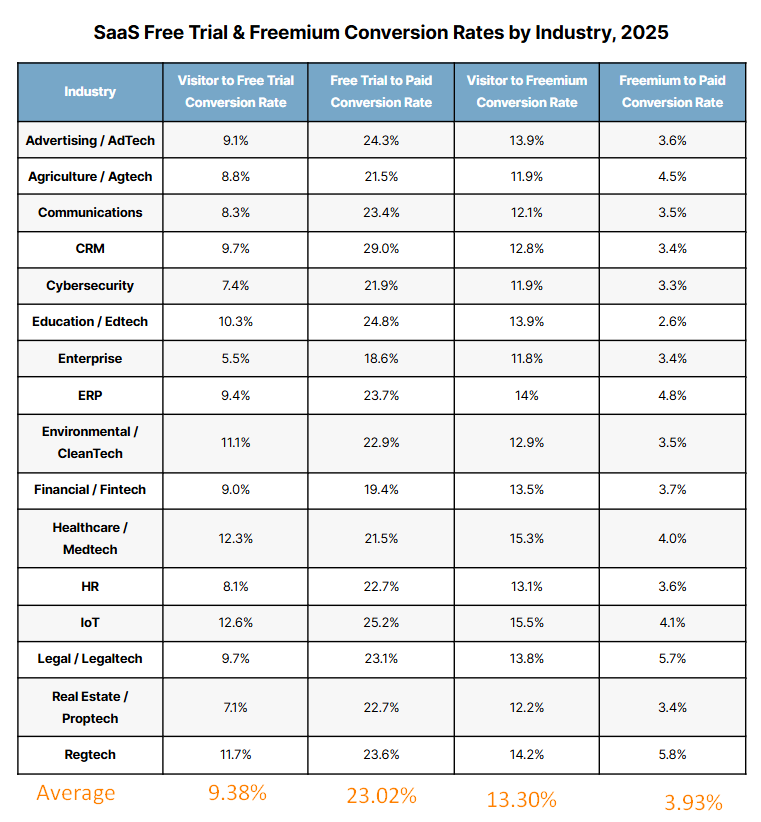
Source: First Page Sage
For context, that’s significantly higher than most top-funnel traffic, which typically converts below 2%. The difference comes from targeting high-intent keywords where searchers are actively evaluating solutions, not just learning about a topic.
Understanding these stages of buyer intent helps shape your entire content calendar. Instead of randomly picking keywords based on search volume, you map each piece of content to a specific buyer stage. Problem-aware content reaches people before they start searching for your product category. Solution-aware content shows how your product fits their specific use case. Product-aware content helps buyers in decision mode choose you over competitors. When you plan content this way, every article has a clear job in your pipeline, not just a traffic target.
Most SaaS companies don’t pay enough attention to problem-aware and solution-aware searchers. They write a few comparison pages and maybe some “best tools” listicles, then wonder why content doesn’t convert. You need all three stages working together; problem-aware content builds awareness, solution-aware content establishes your category, and product-aware content helps to close the deal.

Stage 3: Writing With Your Product as the Natural Solution

Bad SaaS content treats the product like an awkward sales pitch at the end. Good SaaS content weaves the product into the content because it genuinely solves the problem being discussed.
We call this product-led content: content where your product isn’t tacked on, it’s the logical solution.
Example of Forced Product Integration (What NOT To Do):
Here are two common patterns that create a disconnect between educational content and product mentions.
Bad Example #1: Monday.com’s Remote Work Advice
Monday.com’s “7 Best Practices for Managing a Remote Team” offers seven best practices: “build the right tech stack,” “include remote members in meetings,” “reinforce company culture.” The advice is solid, but it applies equally well whether you use Monday.com, Asana, Trello, or no project management tool at all.
The educational content stands on its own, which is great for readers. But after the advice section, a “Ready-to-use template” appears with a screenshot and a “Get started” button. The template isn’t demonstrated or shown solving any problem discussed in the article. There’s a gap between the learning and the product.

Bad Example #2: Asana’s Time Management Tips
Asana’s “18 Time Management Tips” teaches well-known productivity frameworks: the Pomodoro method, Getting Things Done, the Pareto principle, and timeboxing. These are valuable techniques, but they work equally well with sticky notes, spreadsheets, or any task management tool.
Several tips don’t involve software: “take breaks,” “organize your physical space,” “stop trying to multitask.” Throughout the article, “Manage and prioritize tasks with Asana” CTAs appear, but they’re not connected to demonstrating how Asana specifically helps with these techniques. The educational content and the product exist in parallel rather than together.
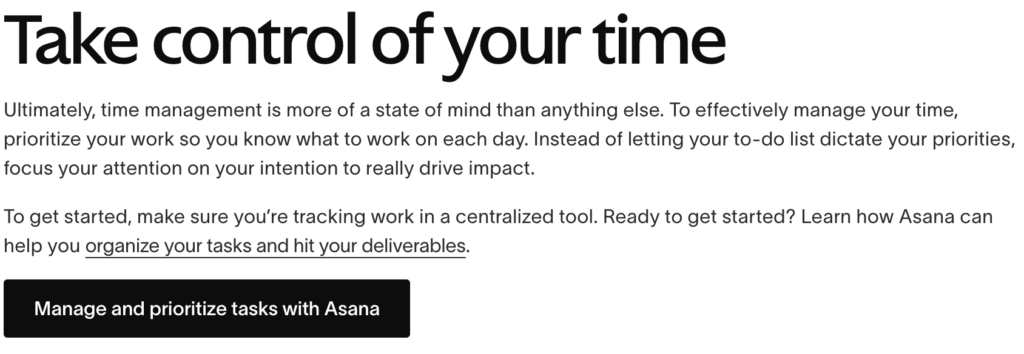
In both cases, the advice would be just as useful without any product mentions. The content and the product aren’t woven together.
Example of Natural Product Integration (What TO Do):
Here are two good examples of product integration done right.
Example #1: Loom’s Training Videos Guide
Loom’s guide on creating training videos .
The difference is firstly structural: an article about creating training videos requires showing how to use recording software. The product isn’t just mentioned, it’s demonstrated.
Here’s what Loom does:
- Opens with a pain point: “Training videos can be hard to make, and harder to watch when you don’t have the right resources”.
- Walks through the solution using their actual interface: The post includes 7+ screenshots showing every step—the desktop app’s recording options (Screen + Camera, Screen Only, Camera Only), the camera bubble overlay, the editing interface, and the sharing panel.
- Shows features solving real problems: When explaining how to make videos more polished, they demonstrate their AI-powered filler word removal. The feature appears because it solves the problem being discussed, not because it’s time for a sales pitch.
- Weaves in customer evidence naturally: The post references how Braze scaled customer onboarding with Loom, not as a testimonial block, but within the educational flow.
The product appears naturally because the tutorial is a product demonstration. There’s no awkward pivot.

Example #2: HubSpot’s Email Marketing Tutorial
HubSpot’s tutorial on email marketing with HubSpot is another example of content that makes the product interface the curriculum.

Every instructional step happens within HubSpot’s interface with exact navigation paths:
- “From within your HubSpot account, navigate to Marketing > Emails”
- “Click Create Email”
- “Edit your email using the intuitive drag and drop email editor”
The article walks readers through collecting contacts, segmenting lists, creating emails, and analyzing performance, all using HubSpot-specific terminology and interface elements. Premium features like “smart rules” for personalization emerge naturally as “next level” capabilities within the learning journey, not as sales pitches.
Users learning email marketing this way must interact with HubSpot’s interface to follow along. The educational value is genuine, but the implementation is HubSpot-specific.
Why This Works:
In effective product-led content, the product is the how, not the what. Loom teaches video creation. HubSpot teaches email marketing. The product enables the learning. Monday.com and Asana teach productivity concepts that work with any tool, so the product mentions feel separate from the content.
When screenshots serve education rather than advertising, readers don’t feel sold to. They feel helped. And when CTAs emerge from demonstrated value, “Try it free” feels like a natural next step, not a bait-and-switch.
At Your Content Mart, we don’t rely on surface-level Google research when writing about client products. We get hands-on access, explore the product end-to-end, and use it to solve real problems. That way, we write from the perspective of an actual user, not someone skimming a browser tab.
This is how we build Signup Engines at Your Content Mart. Customer research reveals the buyer-intent keywords your competitors miss. Strategic content targets prospects at every decision stage. Product integration feels natural, not forced, and every piece optimizes for signups.
We used similar principles for OneCal, a bootstrapped calendar sync tool competing against VC-backed players like Reclaim.ai (acquired by Dropbox for $25M) and Motion. OneCal couldn’t outspend these companies on content teams or link building. They needed a smarter approach.
Instead of chasing high-volume keywords their competitors already dominated, we focused on jobs-to-be-done content: “How to sync Outlook and Google Calendar,” “How to block time on Google Calendar.” We also filled gaps competitors missed by creating “Calendar Bridge alternatives” and similar pages.
The results after 5 months:
● 291% increase in organic clicks (8,000 → 31,300 monthly)
● Ranked #1 for “Calendar Bridge alternatives” (above Reddit and Calendar Bridge’s own site)
● Featured in Google’s AI Overview for “calendar sync software” (mentioned before Calendly and Reclaim.ai)

● Traffic continued growing to 40,000 monthly clicks seven months after our engagement ended
A bootstrapped startup became Google’s first recommendation over competitors with millions in funding. That’s what happens when you build genuine topical authority instead of trying to outspend everyone.
The 4 Types of SaaS Content That Drive Signups

TL;DR: Stop writing generic blog posts. These 4 content types consistently convert: (1) Comparison pages targeting “alternative to [competitor]” searches, (2) Problem-solution content with your product naturally integrated, (3) Use case and integration guides for specific workflows, (4) Templates that demonstrate product value. Each targets different buyer intent stages and converts 5-10x better than educational content.
Not all content is created equal when it comes to converting readers into paying customers.
You can publish 100 blog posts about industry trends and best practices. You might even rank well and get thousands of visitors. But if those visitors aren’t ready to buy, your content is at best educational.
Let me show you the four content types that consistently drive trial signups that convert to paying customers, build predictable revenue from organic content, and more importantly, how to execute them without sounding like a walking advertisement.
1. Bottom-Funnel Comparison Content
When someone searches “Slack vs Microsoft Teams” or “HubSpot alternatives,” they’re not casually browsing. They’re in buying mode. They have budget approval. They’re evaluating options. This is the highest-intent traffic you can get.
Yet most SaaS companies ignore this goldmine because they’re chasing vanity metrics or they think comparison content is “too competitive.”
The BOFU Strategy That Works:
Create three types of comparison content:
- Alternative pages: “Looking for [Competitor] alternatives?”
- Head-to-head comparisons: “[Your Product] vs [Competitor]”
- Category roundups: “Best [Category] Software for [Specific Use Case]”
Let me break down what makes comparison content convert, using Calendly’s comparison page strategy as an example.
Calendly’s Comparison Page Anatomy:
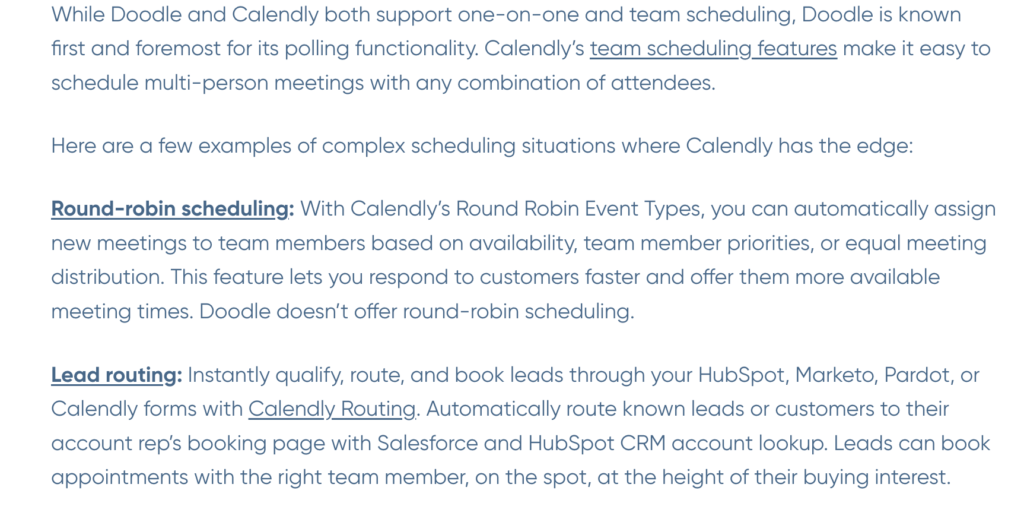
Go to Calendly’s Calendly vs Doodle comparison page. Here’s what they do right:
1. They lead with use cases, not feature checklists
Instead of a generic feature table, Calendly structures comparison around specific scenarios:
- “If you need round-robin scheduling for a sales team…” → Calendly wins
- “If you primarily need group polling for committee meetings…” → Doodle is known for that
- “If you need CRM integration and lead routing…” → Calendly wins
This approach respects reader intelligence. People don’t care that you have “Feature X”, they care whether Feature X solves their specific problem.
2. They acknowledge competitor strengths
Calendly admits: “Doodle is known first and foremost for its polling functionality.” They don’t pretend their competitor has zero value.
This builds trust. When you admit your product isn’t perfect for everyone, the people it IS perfect for trust you more. Readers can smell dishonesty in comparison pages—they’ll bounce if every feature comparison suspiciously favors you.
3. They include specific details
- Actual pricing ($10/month vs $6.95/month on entry tiers)
- Specific feature differences (Calendly offers website embeds on free plan; Doodle doesn’t)
- Integration counts (Calendly: 100+ integrations; Doodle: fewer native options)
Generic comparisons don’t convert. Detailed, helpful ones do.
4. They use actual product screenshots
Throughout the page, Calendly shows its actual interface, booking pages, calendar views, and workflow settings. This isn’t decoration; it’s proof. Screenshots demonstrate that the features they’re describing actually exist and work as claimed.
How to write Bottom Funnel Comparison Content:
Based on this framework, here’s how to write comparison content that converts:
Step 1: Map out real decision criteria
From your customer interviews or support tickets, identify what prospects actually compare when choosing between you and competitors. Don’t guess, use real data.
Common criteria include:
- Specific features for their use case
- Pricing for their team size
- Integrations with their existing tools
- Learning curve and onboarding time
- Support quality
Step 2: Structure around scenarios, not features
Instead of:
“Calendly has feature X. Doodle doesn’t.”
Write:
“If your sales team needs to automatically assign incoming demo requests to available reps, you’ll want Calendly’s round-robin scheduling. Here’s how it works: [screenshot and explanation]. Doodle doesn’t offer this functionality natively.”
Step 3: Be honest about where you lose
Every product has weaknesses. Acknowledging them, and explaining when a competitor might be the better choice, builds enormous credibility. The people who need what you offer will trust your recommendations about why you’re the right choice.
2. Problem-Solution Content (With Your Product Baked In)
This is where most SaaS content lives, but most companies do it wrong. They write about the problem, offer generic solutions, and then awkwardly shoehorn their product into the conclusion.
The right approach? Make your product the natural solution from the start. Let’s use Loom once again as an example.
How Loom Does Problem-Solution Content Right:
Loom didn’t build its audience by talking vaguely about “better team communication.” They built it by addressing specific, frustrating problems that teams face daily, and showing exactly how async video solves them.
Let me break down their approach using a specific example.
This post, “Explain, Document, & Review Code With Video Messages,” is from Loom’s blog
The Specific Pain Point They Address:
Code reviews create bottlenecks. When a developer submits a pull request, reviewers often don’t have context for why certain decisions were made. This leads to:
- Back-and-forth comments asking for clarification
- Misunderstood feedback that creates rework
- Review cycles that stretch from hours to days
How They Structure the Solution:
Instead of generic advice (“communicate better during code reviews”), Loom shows their actual internal process. Their engineering guidelines require each pull request to include:
- A demo Loom to showcase the expected outcome and behavior of the code
- A code overview Loom to walk through how and why the code was written
- A PR description with text comments for additional context
The post then embeds actual Loom videos from their team members demonstrating this in practice:
- Engineering Manager Paulius Dragunas investigating a memory leak
- Technical Lead Claudio Semeraro explaining sparse changes across multiple files to hit test run time quotas
- Engineer Harshyt Goel walking through large changes to their feature flagging infrastructure
Each embedded video shows a real engineer explaining real code decisions—not hypothetical examples.

Why This Works:
The product isn’t “pitched” at the end. The entire post IS a product demonstration wrapped in genuinely useful content. Someone reading this learns how to do better code reviews AND sees exactly how Loom enables that workflow. The embedded videos serve as both education and product proof.
Framework for Writing Problem-Solution Content:
Here’s how to create problem-solution content that naturally integrates your product:
Step 1: Identify problems your product solves that people actively search for
Not problems you wish people had. Problems they’re typing into Google right now.
Where to find these:
- Customer support tickets: What do people ask for help with?
- Sales call recordings: What pain points do prospects mention?
- Reddit and Twitter: How do people describe their frustrations in their own words?
- “People Also Ask” boxes: What related questions does Google surface?
Example: If you sell email marketing software, instead of writing “How to improve email marketing” (too broad, low intent), you can write “How to reduce cart abandonment emails from 5% to 15% open rates in 30 days” (specific problem, measurable goal, high intent).
Step 2: Structure your content around the problem-solution arc
- Acknowledge the problem deeply (show you understand—use specific details and examples)
- Explain why common solutions fall short (this positions your approach as different)
- Walk through your solution step-by-step (with screenshots of your product)
- Show measurable outcomes (results, metrics, customer examples)
Step 3: Get specific with your examples
The difference between good problem-solution content and great problem-solution content is specificity.
Generic: “How to improve email marketing”
Specific: “How to recover 15% of abandoned carts with a 3-email sequence”
When you get specific, you attract smaller audiences, but they’re exactly the right audiences. The people reading that second headline are e-commerce managers actively trying to solve this problem. They’re qualified buyers if you sell email marketing software.
3. Use Case and Integration Content
Most SaaS products do more than one thing. Some work with other tools, and others solve problems for multiple industries. Use case content exploits all of that.
How Zapier Dominates Use Case Content:
Zapier built one of the most successful SEO strategies in SaaS history, not by creating content about “automation” broadly, but by creating thousands of pages for specific integrations and workflows.
Here’s exactly how their strategy works:
The Page Architecture:
Zapier has a four-tier hierarchy of integration pages:
- App landing pages (e.g., zapier.com/apps/slack)
- Overview of what you can automate with Slack + Zapier
- Links to all Slack integration possibilities
- App-to-app integration pages (e.g., zapier.com/apps/slack/integrations/google-sheets)
- Specific page for connecting Slack to Google Sheets
- Shows popular “Zaps” (automated workflows) for this pair

- Zapier template pages (e.g., specific workflow like “Send Slack messages for new Google Sheets rows”)
- One page per specific automation
- Ready-to-use template users can activate

- Best apps blog posts (e.g., “Best note-taking apps”)
- List posts comparing tools in a category
- Each tool section includes “Automate [Tool] with Zapier” CTAs
Why This Works:
Each page targets a specific long-tail search query that someone would type when they want to connect two specific apps. “How to connect Gmail to Slack” → Zapier has a page for that. “Automatically add Typeform responses to Google Sheets” → Zapier has a page for that.
The searcher finds exactly what they need, and using Zapier is the natural way to accomplish it.
How to Implement Use Case and Integration Content for your SaaS Product:
You don’t need to be Zapier-sized to use this strategy. Here’s a practical approach:
Step 1: Map your integration ecosystem
Make a list of:
- Every tool your product integrates with
- Every use case or workflow each integration enables
Example for a project management tool:
| Integration | Use Cases |
| Slack | Send task notifications to channels, create tasks from Slack messages, daily standup summaries |
| Google Calendar | Sync deadlines, block time for focused work, auto-schedule recurring tasks |
| GitHub | Link commits to tasks, auto-update task status on merge, create tasks from issues |
Step 2: Prioritize by search volume and customer demand
Use Ahrefs or Semrush to check search volume for queries like:
- “[Your product] + [Integration] integration”
- “How to connect [Your product] to [Integration]”
- “[Integration] project management integration”
Also, check your support tickets. What integrations do customers ask about most?
Step 3: Create dedicated pages for top integrations
For each priority integration, create a page that includes:
- Why this integration matters (specific problems it solves)
- Step-by-step setup guide (with screenshots from YOUR product)
- Common workflows and use cases (with examples)
- Troubleshooting section (addresses common issues)
Step 4: Interlink everything
Each integration page should link to:
- Related integration pages
- Relevant use case content
- Your main features page
This creates topical authority. Google sees you as THE resource for “[Your Product] integrations.”
4. Template and Tool Content
This is the Trojan horse of SaaS content. You give away something genuinely useful for free, and in the process of using it, people discover they need your paid product.
How Notion’s Template Gallery Drives Signups:

Notion’s template gallery is one of the best examples of template-driven growth in SaaS.
Here’s how it works:
The Strategy:
Notion offers thousands of free templates for everything from personal task management to company wikis. Each template has its own SEO-optimized page that targets specific search queries.
Example: The Content Calendar Template
When someone searches “content calendar template,” they find Notion’s template page.

Here’s what happens:
- They land on a dedicated page showing the template preview, description, and use cases

- They click “Get this template”

- They’re prompted to sign up for Notion (free account) to use it
- The template opens in their Notion workspace
The template introduces them to the product. If they like it, they stay. If they need more advanced features (API access, unlimited guests, admin controls), they upgrade.
Keywords Notion Ranks For:
Notion’s template pages rank for a number of template-related keywords on Google SERP:
- “project tracker template”
- “meeting notes template”
- “content calendar template”
- “OKR template”
- “sprint planning template”
- “personal CRM template”
Each keyword represents someone looking for a tool to solve a specific problem. Notion’s template IS the tool.
Another Example: Smartsheet’s Template Strategy
Smartsheet (a project management tool competing with Excel) targets people who currently use spreadsheets by meeting them where they are.
Their approach: offer genuinely useful free Excel templates, then show why the Smartsheet version is better.
Take their Free Project Management Excel Templates page. It offers downloadable Excel templates for:
- Project trackers
- Gantt charts
- Project budgets
- RACI matrices
- Risk assessments
- Work breakdown structures
Each template section follows the same structure:
- Free Excel download — A genuinely useful, no-strings-attached template
- Smartsheet alternative — A “Try the Smartsheet [Template Name] Template” button right below
- Value comparison — Language explaining what Smartsheet adds: “all with built-in automation and collaboration you won’t get from a static Excel sheet”
For example, their Project Tracker section offers an Excel download, then adds: “Use the Project Tracking and Rollup template in Smartsheet to quickly monitor milestones, flag at-risk tasks, map out processes, and generate a real-time dashboard.”

Why This Works:
The Excel template is genuinely useful. Someone can download it, use it forever, and never touch Smartsheet. But the side-by-side comparison plants a seed: “This works, but there’s a better version.” Every time the user hits Excel’s limitations (no real-time collaboration, manual updates, version control headaches), they remember the alternative sitting right there.
This is product-led content for a competitor’s users. The free resource builds trust. The comparison creates consideration. And the user converts themselves when they’re ready.
How to Implement Template Content:
Step 1: Identify templates your audience needs
Based on your customer research:
- What tools do your customers use before they find you? (Replace those tools with templates)
- What workflows do they need to accomplish? (Create templates that enable those workflows)
- What formats do they expect? (Spreadsheets, docs, dashboards, etc.)
Step 2: Make templates genuinely useful as a standalone
If someone can use your template and get value without ever touching your product, you’ve done it right. This builds trust and goodwill. The best prospects will naturally want more.
Step 3: Create a clear path from template to product
The path should be obvious but not pushy:
- “This template is even more powerful inside [Product]—here’s why”
- Feature comparison showing what the template enables vs. what the full product enables
- CTA to try the product with their template data already imported
Your 90-Day SaaS Content Implementation Roadmap

TL;DR: Month 1: Create 3-4 comparison pages targeting your top competitors. Month 2: Publish 4 problem-solution articles with content upgrades. Month 3: Add use case content and templates, then analyze what converts best. Focus on bottom-funnel content first—it drives signups within 30-60 days vs 4-6 months for top-funnel content.
Download Your 90-Day SaaS Content Implementation Roadmap
Month 1: Bottom-Funnel Foundation
Weeks 1-2: Research and Planning
- Interview 3-5 recent customers to identify what they searched before finding you
- Interview the sales team to identify top competitors, prospects compare you against
- Review Google Search Console for branded and comparison queries you already get
- Create outlines for 3-4 comparison pages based on real sales objections
Key questions to answer:
- Which 3 competitors do prospects mention most in sales calls?
- What specific objections do prospects raise about those competitors?
- What features do customers say made them choose you?
Weeks 3-4: Create and Publish
- Write and publish 3-4 comparison pages following the framework above
- Add clear CTAs tied to trials, demos, or signups (not generic newsletter signups)
- Set up conversion tracking for each page (goal: track signup source)
- Create basic internal linking from homepage/features pages to comparison content
Goal: Capture high-intent buyers already evaluating alternatives.
Success metrics: Track signups attributed to each comparison page. Even 2-5 signups per month from a comparison page is strong ROI for content that took a few days to create.
Month 2: Problem-Solution Content
Weeks 5-6: Identify High-Intent Problems
- Review support tickets for most common questions and pain points
- Analyze onboarding feedback and churn reasons
- Identify 3-4 problems your product directly solves that have search volume
- Create detailed outlines including product screenshots and specific examples
How to prioritize:
- Problems that customers mention in support tickets = high intent
- Problems with searchable keywords (check Ahrefs/Semrush) = discoverable
- Problems your product solves better than alternatives = differentiated
Weeks 7-8: Create and Optimize
- Publish 3-4 problem-solution articles with your product naturally integrated
- Add content upgrades where useful (checklists, setup guides, templates)
- Test CTA placement—try early, middle, and end positions
- Measure time on page and scroll depth to gauge engagement
Goal: Attract buyers earlier in their decision process without losing purchase intent.
Success metrics: Conversion rate by CTA position, content upgrade download rate, signups per article.
Month 3: Use Cases, Templates, and Optimization
Weeks 9-10: Expand Content Types
- Publish 2-3 use case or integration pages for your most-requested integrations
- Create one high-value template or tool (spreadsheet, calculator, checklist)
- Strengthen internal linking across all bottom-funnel content
- Add your new content to relevant existing pages (features, homepage, etc.)
Weeks 11-12: Analyze and Plan Forward
- Review conversion data by page and content type
- Identify which pages drive signups vs. which drive only traffic
- Double down on content types that convert
- Plan Q2 around what performs, not what’s easy to create
Goal: Turn content into a predictable acquisition channel and identify what works for your specific audience.
Success metrics: Signups per content type, conversion rate by topic, revenue attributed to organic content.
Beyond 90 Days: Scale What Works
Once your bottom-funnel pages show consistent conversions, shift from creation to amplification. Scale what already works:
Expand around high performers:
- High-performing comparison pages → add related migration guides, pricing breakdowns, decision guides
- High-performing use case pages → add integration tutorials, advanced workflow guides
- High-performing templates → add template variations for different industries/roles
Optimize existing content:
- Refresh pages that convert but have dropped in rankings
- Improve clarity and tighten positioning on pages that get traffic but don’t convert
- Update competitor details, pricing, and feature comparisons quarterly
Build supporting content:
- Once bottom-of-funnel converts reliably, add middle-of-funnel content that links to your converting pages
- Create linkable assets (original research, industry reports) that build authority to your commercial pages
Your First Step to High-Intent SaaS Content

Most SaaS content fails because it starts in the wrong place. Teams chase traffic, celebrate rankings, and wait months to see if any of it turns into revenue.
High-performing SaaS content does the opposite. It begins with buyer intent. It targets people comparing tools, evaluating solutions, and deciding whether to switch. Comparison pages, problem-solution content, use cases, and templates work because they align with real buying behaviour and close the gap between interest and action.
FAQs on SaaS Content Writing

How is SaaS content writing different from general content writing?
SaaS content focuses on buying decisions, not just education. It requires product knowledge, awareness of the sales process, and clear conversion paths.
How much does SaaS content writing cost?
Rates typically range from $500 to $2,000 per article, depending on depth, research, and technical complexity. Comparison and use-case content usually costs more.
Can SaaS content be written without technical knowledge?
Not effectively. Strong SaaS content combines clear writing with accurate product details, often through collaboration with product or engineering teams.
How long does it take to see results from SaaS content?
Bottom-funnel content can drive conversions within 30–90 days. Top-funnel content usually takes several months to show impact.
Should SaaS companies write top-of-funnel or bottom-of-funnel content first?
Bottom-funnel first. Content targeting buyers with commercial intent converts significantly better than general informational content. Prove ROI first, then expand.


